First, I want to say that I believe the Banks iDash is a great product and works very well for many people.
That said, there are a few downsides worth noting. The iDash requires modifying the vehicle’s interior appearance, and the display size can be difficult for some users to see clearly. Additionally, with a cost north of $400, it is more than many owners want to spend solely to monitor vehicle data.
I would like to help the community by sharing a lower-cost alternative by sharing my real-world experience.
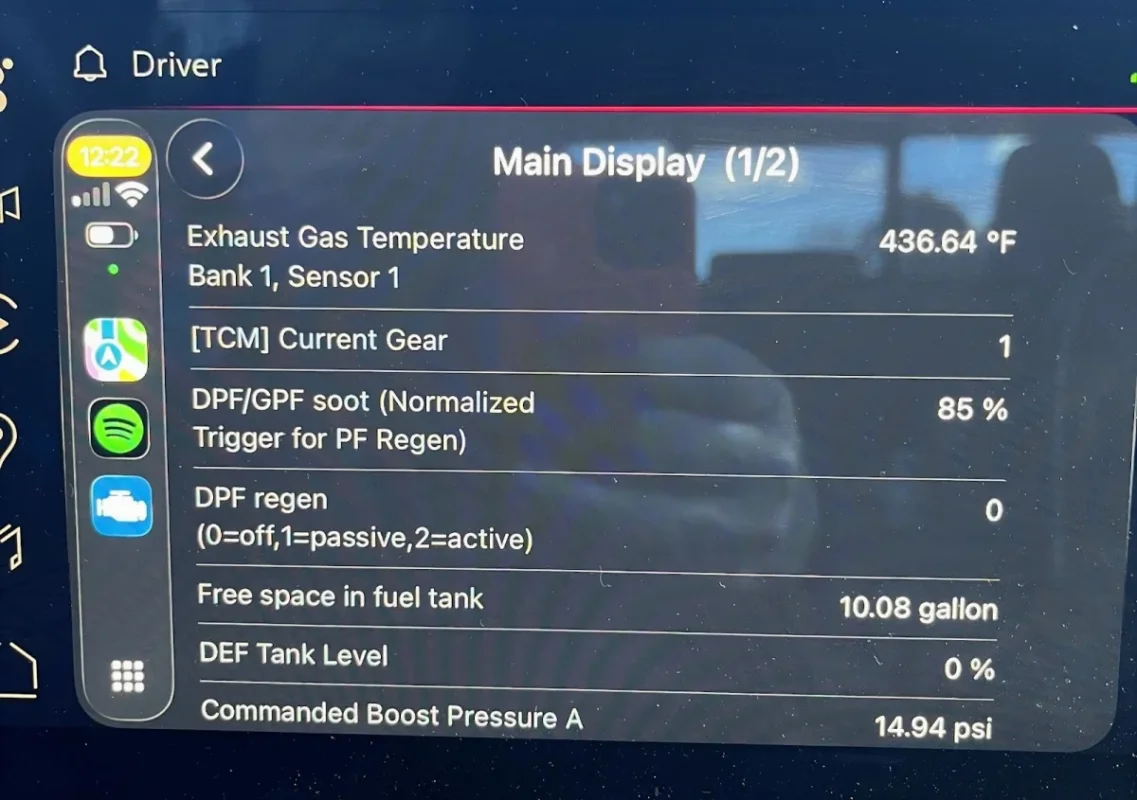
All software in the Apple’s App Store or Google Play Store goes through in-depth testing before it is released for use.
All that I can tell you. It Just Works!
I have put together an alternative solution that:
With this setup, you can:
It also works with Android Auto.
Since most of us already have our phones with us whenever we travel, this solution works well for the majority of users. While it may not be ideal for everyone, it has proven very reliable for my needs.
I have been using this setup on my truck since July 2025, and it has performed very well. Like any software-based solution, there are a few minor caveats, but they are easy to address once you know how.
I have tried several OBDII scanners, and this setup has been the most reliable overall, although other options may perform better or worse depending on the use case.
Important:
I have tried the OBDLink MX+ adapter and found that the connection over bluetooth was inconsistent with the IOS iphone running Bluetooth Low Energy (BLE). BLE on iPhone which you can’t change, Just the way IOS uses Bluetooth.
The OBDLink CX adapter handles BLE much better and has no issues when connecting. The OBDLink MX+ adapter had to be power reset fairly often to make the connection.
Fix:
Fix:
Configuration Guide:
 www.carscanner.info
Software Version Used:
Car Scanner Pro – Version 1.121.0
That said, there are a few downsides worth noting. The iDash requires modifying the vehicle’s interior appearance, and the display size can be difficult for some users to see clearly. Additionally, with a cost north of $400, it is more than many owners want to spend solely to monitor vehicle data.
I would like to help the community by sharing a lower-cost alternative by sharing my real-world experience.
Overview of the Alternative Solution (Car Scanner Pro)
I have no endorsement for this software and have no affiliations with this Co.All software in the Apple’s App Store or Google Play Store goes through in-depth testing before it is released for use.
All that I can tell you. It Just Works!
I have put together an alternative solution that:
- Is significantly lower in cost
- Maintains a clean, OEM interior appearance
- Requires no modifications to the vehicle
- Has no warranty implications
- Is read-only (no tuning or writing to the ECM)
With this setup, you can:
- View ECM trouble codes
- Monitor live sensor data
- Track regeneration status and behavior
Display and Compatibility
All data is displayed through the factory infotainment system using Apple CarPlay when the phone is connected to the truck.It also works with Android Auto.
Since most of us already have our phones with us whenever we travel, this solution works well for the majority of users. While it may not be ideal for everyone, it has proven very reliable for my needs.
I have been using this setup on my truck since July 2025, and it has performed very well. Like any software-based solution, there are a few minor caveats, but they are easy to address once you know how.
I have tried several OBDII scanners, and this setup has been the most reliable overall, although other options may perform better or worse depending on the use case.
Important:
I have tried the OBDLink MX+ adapter and found that the connection over bluetooth was inconsistent with the IOS iphone running Bluetooth Low Energy (BLE). BLE on iPhone which you can’t change, Just the way IOS uses Bluetooth.
The OBDLink CX adapter handles BLE much better and has no issues when connecting. The OBDLink MX+ adapter had to be power reset fairly often to make the connection.
Total Cost
The total cost is under $125 at the time of this publication.Software Caveats and Fixes
Issue 1: Dashboard data does not display after connecting
Cause: Occasionally, when the app connects to the OBDII adapter and you have the “Connect on launch” and “Open dashboard after connecting” selected in the Car Scanner Pro app.The dashboard may load without live data. If you only have the “Connect on launch” selected you will have no issues with the app. This is only with Apple IOS. Android doesn't have this issue.Fix:
- Press the back button
- Re-select the dashboard you want to view
Issue 2: App fails to connect (very rare)
Cause: The app runs in the background, and occasionally the phone’s operating system may glitch.Fix:
- Close the Car Scanner app on your phone
- Relaunch it through CarPlay
Issue 3: OBDII adapter does not communicate with the ECM (extremely rare)
Fix:- Use the power switch on the OBDII extension cable
- Turn the switch off, then back on
Software Setup Information
Car Scanner Website:Configuration Guide:
Configuring Car Scanner – Car Scanner ELM OBD2
www.carscanner.info
Software Version Used:
Car Scanner Pro – Version 1.121.0
Software Pricing (In-App Purchase)
The Car Scanner app is free to download, but advanced features require the Pro upgrade.- Recommended for this setup Pro (Lifetime): ≈ $7.99
- Pro (Lifetime): ≈ $7.99
- Pro (6-Month): ≈ $3.99
- Pro (1-Year): ≈ $4.99
- Other labeled Pro options: ≈ $6.99
Car Scanner App Configuration
- Vehicle Profile: GMC Silverado/Sierra 3.0L LZ0 (2023–Present)
- Adapter Type: OBDII ELM327
- “Connect on launch”
- “Open dashboard after connecting”
Hardware Used
- OBDLink CX BimmerCode Bluetooth 5.1 OBD2 Adapter – ~$80
Amazon.com: OBDLink CX Bimmercode Bluetooth 5.1 OBD2 Adapter for BMW/Mini, Works with iPhone/iOS & Android, Car Coding, OBD II Diagnostic Scanner : Automotive
Buy OBDLink CX Bimmercode Bluetooth 5.1 OBD2 Adapter for BMW/Mini, Works with iPhone/iOS & Android, Car Coding, OBD II Diagnostic Scanner: Code Readers & Scan Tools - Amazon.com ✓ FREE DELIVERY possible on eligible purchaseswww.amazon.com - Ultra-Slim OBDII Extension Cable with Power Switch – ~$12
- OBD2 Splitter (1 Male to 2 Female) – ~$19
- Car Scanner Pro App – ~$8